
Your Origin IP Leaks. Lock It With Cloudflare mTLS
/ 14 min read
Table of Contents
People put a site behind Cloudflare, watch the orange cloud hide their server IP, and quietly file “origin is hidden” under “origin is safe”. Those are not the same thing.
Your origin IP leaks. Some of it you even publish on purpose. And the day someone has that IP, they can knock on your server directly and skip everything Cloudflare does for you: the WAF, rate limiting, bot mitigation, the managed challenge, all of it. They talk straight to nginx as if Cloudflare was never there.
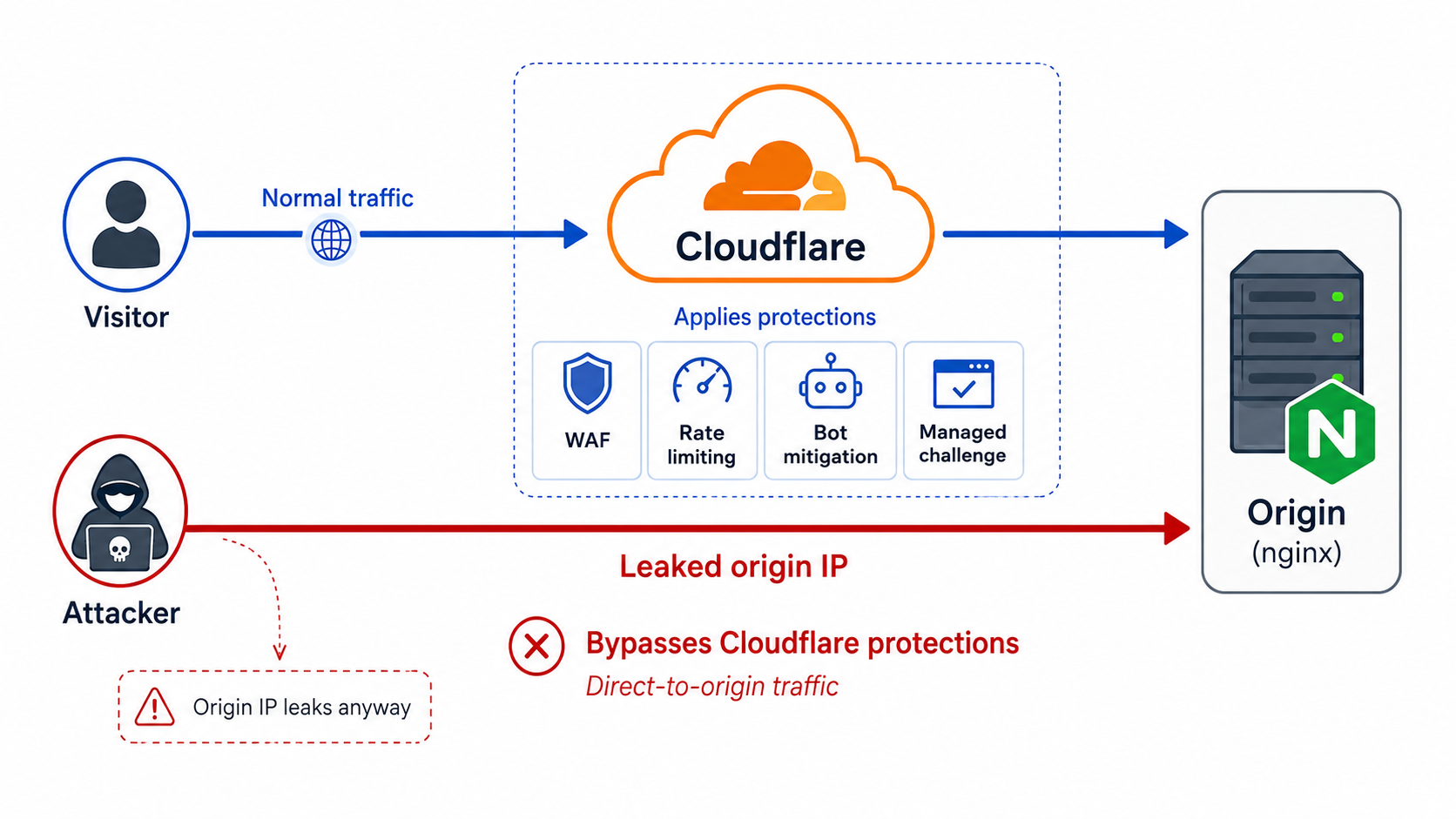
This is how I close that door. The short version: stop pretending the IP is secret, and make it useless instead.
The orange cloud is not a wall
The proxy hides your origin IP from a casual DNS lookup, and that is genuinely useful. The problem is that it is the only thing it does on this front, and there are a dozen side channels that give the IP away:
- Certificate Transparency logs. Every public certificate you have ever issued is logged forever. Old certs, staging certs, a cert you once put directly on the origin: all searchable.
- Passive and historical DNS. Services like SecurityTrails and DNSDB keep the
Arecord you had before you turned on the proxy. The orange cloud does not rewrite history. - Internet-wide scanning. Shodan and Censys scan the whole IPv4 space constantly. If your origin answered on 443 with a recognizable certificate or response, it is indexed.
- The app itself. A misconfigured mailer, a verbose error page, a webhook, a redirect that uses the raw IP. Plenty of apps cheerfully leak their own address.
You can play whack-a-mole with all of that. Or you can accept the obvious and move on.
Records you cannot proxy
Here is the part people forget. Cloudflare’s proxy only fronts HTTP and HTTPS (plus a couple of specific cases). Anything else has to be a DNS-only record, grey cloud, pointing straight at your real IP.
A mail server, an SSH jump host, a game server, a sync node, any raw TCP or UDP service: that subdomain needs a plain A record that resolves to the origin, because there is no web proxy to hide behind for non-web traffic. Every grey-cloud record is a billboard with your IP on it, sitting in public DNS for anyone who runs dig.
So the honest threat model is: treat the origin IP as public. The control that actually matters is not “they cannot find my server”, it is “even with my IP, they cannot use it”. That is what the rest of this post builds.
The plan: two layers
I gate the origin twice.
- A firewall that only lets Cloudflare’s IP ranges reach ports 80 and 443. Everyone else gets dropped at L3/L4.
- Mutual TLS (Cloudflare calls it Authenticated Origin Pulls) so that even a connection coming from a Cloudflare IP has to present Cloudflare’s client certificate, or nginx refuses it.
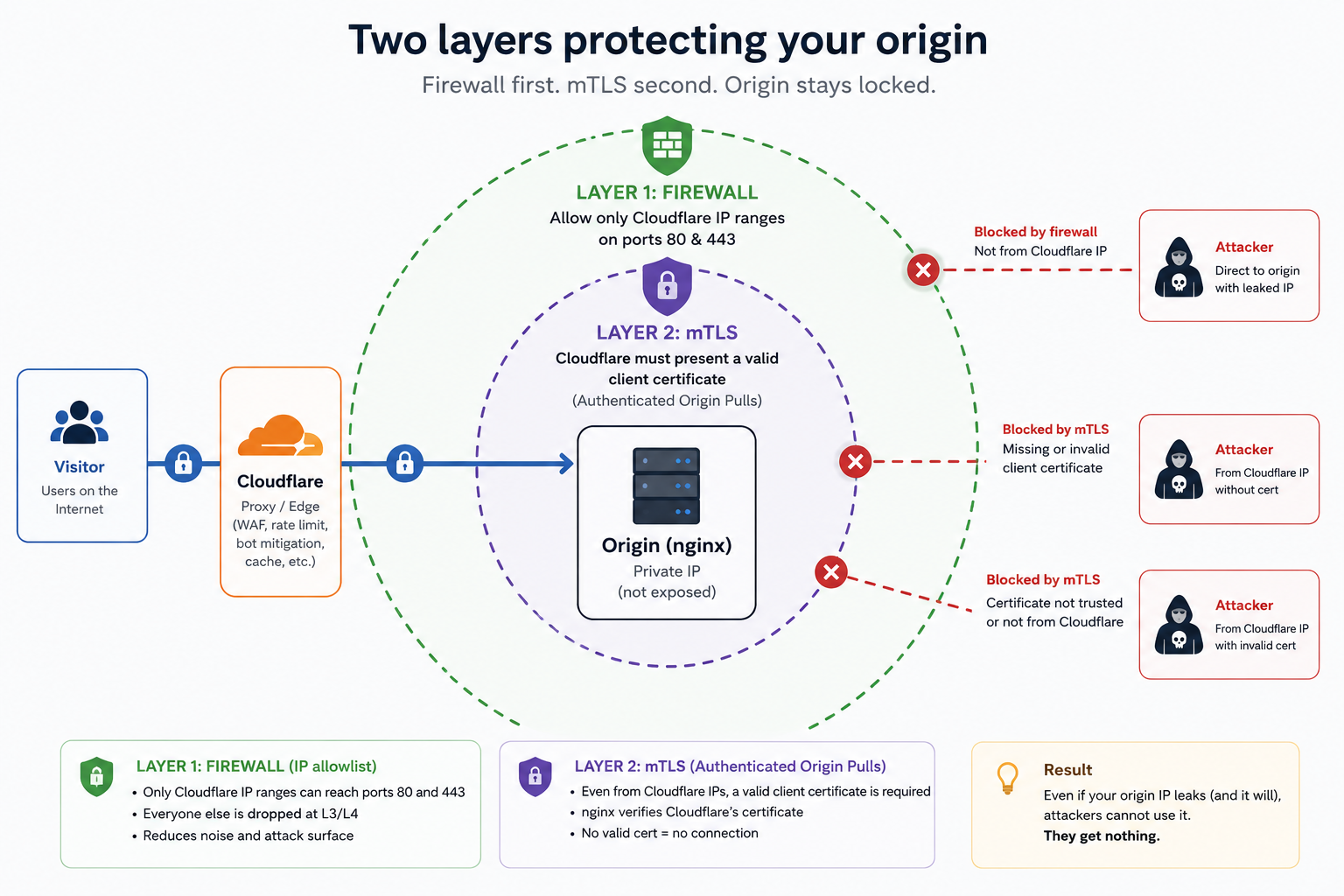
Belt and suspenders, on purpose. The firewall kills the background noise and shrinks the attack surface, but Cloudflare’s ranges are large, shared, and they drift over time, so a firewall alone is brittle and coarse. mTLS is the cryptographic gate that does not care about IPs at all. Each layer covers the other one’s weak spot.
Layer 1: only Cloudflare gets to knock
The firewall is plain UFW. Default deny inbound, SSH on its own non-default port, and 80/443 open only to the current Cloudflare ranges:
To Action From-- ------ ----<ssh-port>/tcp ALLOW IN Anywhere # SSH80,443/tcp ALLOW IN 173.245.48.0/20 # Cloudflare-auto80,443/tcp ALLOW IN 103.21.244.0/22 # Cloudflare-auto80,443/tcp ALLOW IN 104.16.0.0/13 # Cloudflare-auto... ALLOW IN ... # Cloudflare-autoFrom a random host on the internet, a direct hit on the origin IP never even reaches nginx. The SYN is dropped and the connection just hangs until it times out. That alone stops the bots that scrape Shodan and spray every IP they find.
I do not maintain that list by hand. More on that later, because keeping it fresh is the whole game.
Layer 2: and it has to prove it is Cloudflare
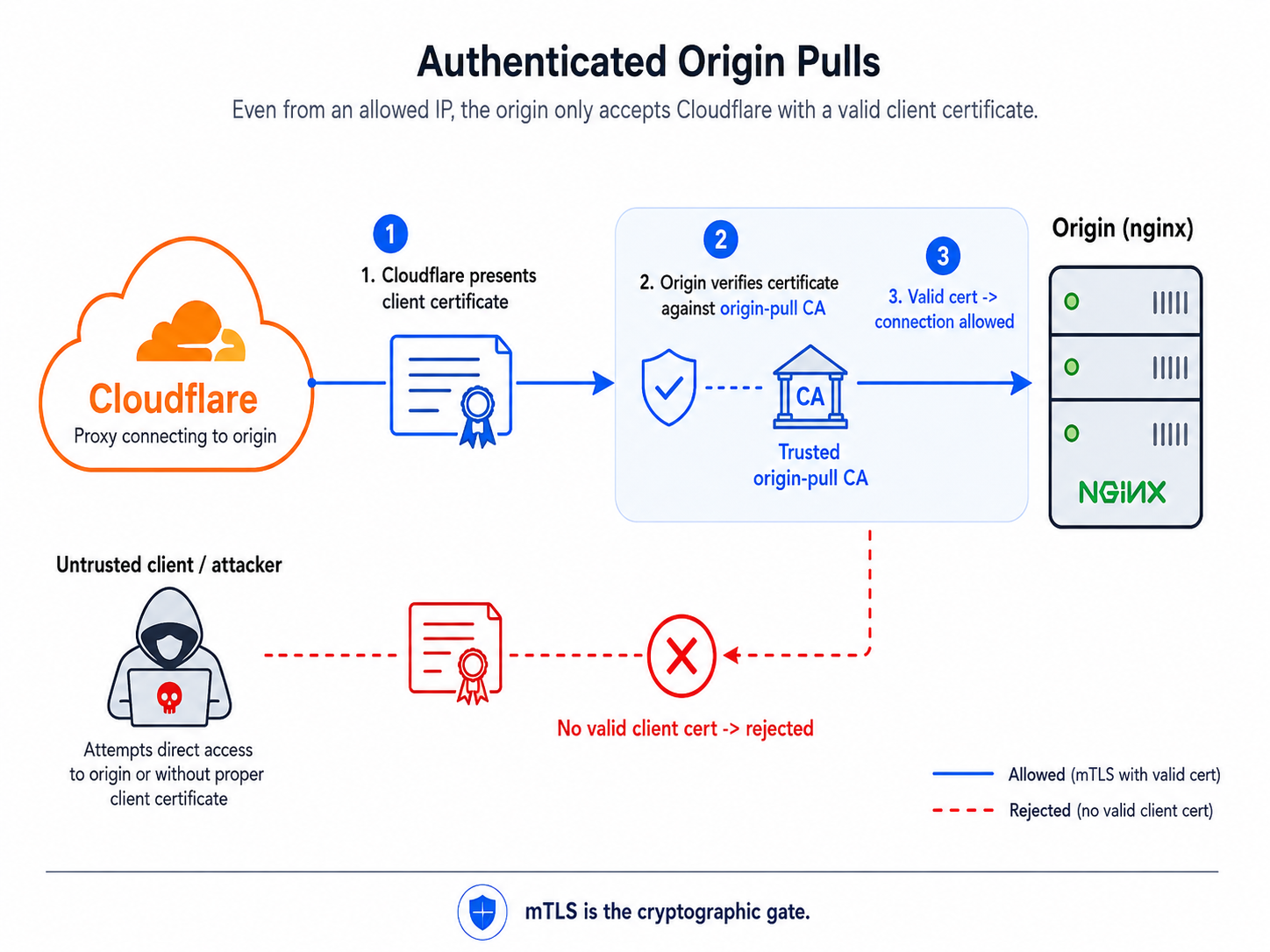
A firewall that allows “all of Cloudflare” is a wide door. Cloudflare’s IPs are shared infrastructure, so “came from a Cloudflare IP” is not the same as “came from Cloudflare acting for my site”. The cryptographic version of that guarantee is Authenticated Origin Pulls.
The idea is mutual TLS turned around. Normally the server proves its identity to the client. Here, Cloudflare also presents a client certificate when it connects to my origin, and my origin verifies it. No valid certificate, no conversation.
The Cloudflare side
Two things have to be true in the dashboard:
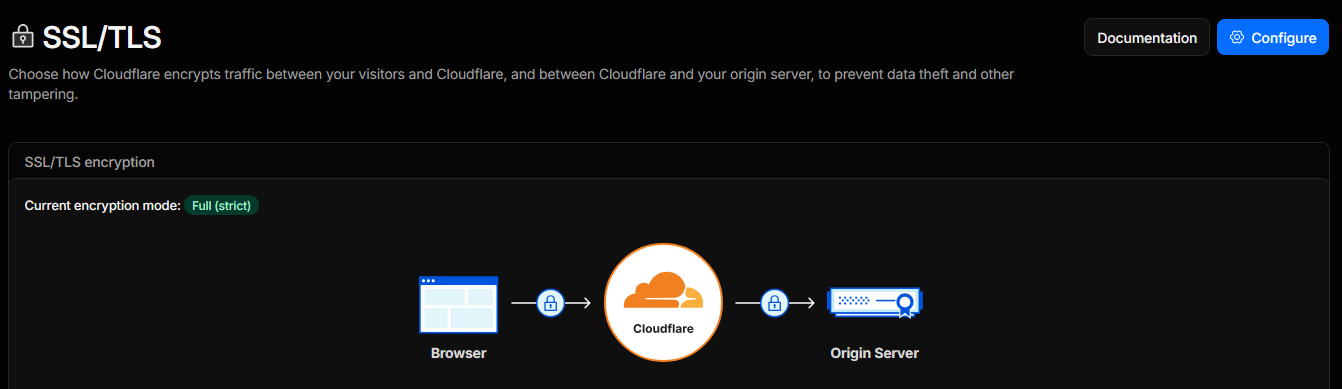
- SSL/TLS encryption mode is Full (strict). This matters: Authenticated Origin Pulls is ignored entirely if your mode is Off or Flexible. Full (strict) is the right setting anyway, since it makes Cloudflare validate the certificate on my origin too.
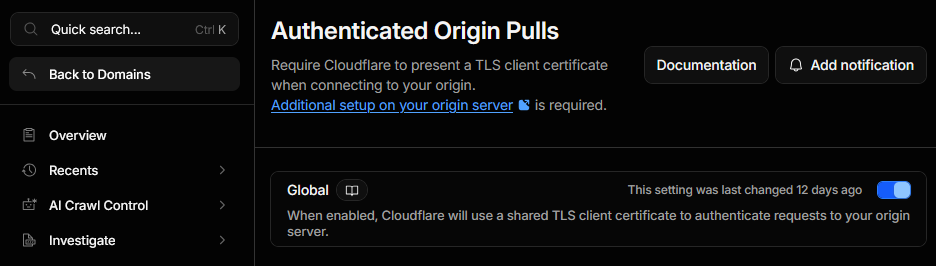
- Authenticated Origin Pulls is enabled under
SSL/TLS -> Origin Server. With the zone toggle on, Cloudflare starts presenting its origin-pull certificate on every connection to my origin.
The origin side
This is the part that does the enforcing, and it is short. One nginx snippet that I include in every server block:
# a reusable snippet, included by every sitessl_client_certificate /etc/nginx/cloudflare/origin-pull-ca.pem;ssl_verify_client on;ssl_ecdh_curve X25519:prime256v1:secp384r1;ssl_client_certificate is the trust anchor: the CA whose client certificates I am willing to accept. ssl_verify_client on makes presenting a valid one mandatory. The ssl_ecdh_curve line is unrelated hardening of the key exchange that I keep in the same file.
Then every site just pulls it in:
server {    server_name example.com;    root /var/www/example.com;
    listen 443 ssl;    ssl_certificate     /etc/letsencrypt/live/example.com/fullchain.pem;    ssl_certificate_key /etc/letsencrypt/live/example.com/privkey.pem;
    include /etc/nginx/snippets/cloudflare-aop.conf;   # the gate}
The certificate, and an honest caveat
The CA that signs Cloudflare’s origin-pull certificate is published by Cloudflare. You can download it here:
https://developers.cloudflare.com/ssl/static/authenticated_origin_pull_ca.pemInspect it and you get a self-signed Cloudflare certificate:
subject= C=US, O=CloudFlare, Inc., OU=Origin Pull, CN=origin-pull.cloudflare.netissuer = C=US, O=CloudFlare, Inc., OU=Origin Pull, CN=origin-pull.cloudflare.netNow the caveat I want to be straight about. This is the global origin-pull certificate, and it is shared across every Cloudflare account. So verifying it proves a request came through the Cloudflare network. It does not prove the request came through my Cloudflare account. If you need that stronger guarantee, Cloudflare lets you upload your own certificate and run zone-level or per-hostname Authenticated Origin Pulls, where the certificate is exclusive to you (and you cannot use the global certificate for per-hostname, you have to bring your own).
For my threat model, which is “random scanners and bots hitting a leaked IP”, the global certificate is enough: none of them have it, so none of them get in. If your origin is a juicier target where another Cloudflare tenant pointing at your IP is a real worry, that is the moment to switch to your own certificate. I will probably write that follow-up.
The catch-all that says nothing
One more server block earns its keep: the default one, which catches any request whose hostname I do not serve. It presents a junk certificate, still demands the Cloudflare client certificate, and for anything it does not recognize it closes the connection with nginx’s non-standard 444:
server {    listen 80 default_server;    listen 443 ssl default_server;
    ssl_certificate     /etc/ssl/certs/placeholder.crt;    ssl_certificate_key /etc/ssl/private/placeholder.key;    include /etc/nginx/snippets/cloudflare-aop.conf;
    server_name _;    return 444;}
The point is to leave no fallback surface. A request that reaches nginx for a hostname I never configured does not land on the first vhost in the file and does not leak a default page. It gets 444, which means nginx hangs up without sending a single byte. Anything that arrived over HTTPS without the certificate already got a 400, and anything not from a Cloudflare IP never made it past the firewall in the first place.
Proving it
Put yourself in the attacker’s shoes. You found the origin IP, so you point curl straight at it and skip Cloudflare. From any normal machine on the internet, here is the whole experience:
curl -v --connect-timeout 5 --resolve example.com:443:ORIGIN_IP https://example.com/* Trying ORIGIN_IP:443...* Connection timed out after 5003 milliseconds* closing connection #0curl: (28) Connection timed out after 5003 millisecondsThat is Layer 1, and it is the only thing a scanner ever sees. Your source IP is not a Cloudflare IP, so UFW drops the packet at L3/L4 before nginx is even aware of it. No error, no banner, no page to fingerprint: the socket just hangs and gives up.
To watch the second layer reject something you first have to get past the firewall. The easy way to test it in isolation is from the origin box itself over loopback, which UFW allows, so the request actually reaches nginx. Without the client certificate, nginx shuts the door:
curl -skI --resolve example.com:443:127.0.0.1 https://example.com/HTTP/1.1 400 Bad RequestServer: nginxConnection: closeThe body says exactly why: No required SSL certificate was sent. That is Layer 2. Two layers, two different “no”: a timeout from the outside, and a 400 for anything that reaches nginx without the certificate.
Through Cloudflare, with the proxy presenting its certificate, the same URL is a normal 200. Nothing changes for real visitors.
Keeping it honest: automation
Here is the trap. Cloudflare’s IP ranges change, and the origin-pull CA can rotate. If you hardcode either one and forget about it, one day Cloudflare adds a range, your firewall silently blocks part of its own traffic, and you are debugging intermittent 522s at 2am. Static config is how this setup rots.
So I do not keep any of it static. A single script refreshes the firewall ranges, the origin-pull CA, and the real-IP list, validates everything before touching the live config, and reloads nginx only if the config still tests clean. It runs weekly from cron and logs a SUCCESS or FAILURE line.
#!/usr/bin/env bash# Restrict inbound TCP 80/443 to current Cloudflare ranges via UFW, refresh the# Cloudflare origin-pull CA used for mTLS, and regenerate the nginx real-ip snippet.# IPv4 always; IPv6 only if UFW has IPV6=yes. Idempotent; safe-aborts on bad fetch.# Logs a timestamped start and a final SUCCESS / FAILURE line (cron -> /var/log/cf-ufw.log).set -euo pipefailexport PATH=/usr/sbin:/usr/bin:/sbin:/bin
PORTS="80,443"TAG="Cloudflare-auto"V4_URL="https://www.cloudflare.com/ips-v4"V6_URL="https://www.cloudflare.com/ips-v6"REALIP="/etc/nginx/snippets/cloudflare-real-ip.conf"CA_URL="https://developers.cloudflare.com/ssl/static/authenticated_origin_pull_ca.pem"CA_FILE="/etc/nginx/cloudflare/origin-pull-ca.pem"
log(){ printf '[%s] %s\n' "$(date -Is)" "$*"; }
IPV6_ON=0if grep -qi '^IPV6=yes' /etc/default/ufw 2>/dev/null; then IPV6_ON=1; fi
t4="$(mktemp)"; t6="$(mktemp)"trap 'rc=$?; rm -f "$t4" "$t6"; if [ "$rc" = 0 ]; then log "SUCCESS"; else log "FAILURE (exit $rc)"; fi' EXIT
log "start (IPV6_ON=$IPV6_ON)"
curl -fsS --max-time 20 "$V4_URL" -o "$t4" || { log "ERROR: download IPv4 ranges failed"; exit 1; }if [ "$IPV6_ON" = 1 ]; then  curl -fsS --max-time 20 "$V6_URL" -o "$t6" || { log "ERROR: download IPv6 ranges failed"; exit 1; }fi
re4='^([0-9]{1,3}\.){3}[0-9]{1,3}/[0-9]{1,2}$'re6='^[0-9a-fA-F:]+/[0-9]{1,3}$'check() {  local f="$1" re="$2" n=0 line  while IFS= read -r line || [ -n "$line" ]; do    [ -z "$line" ] && continue    if ! [[ "$line" =~ $re ]]; then log "ABORT: invalid CIDR '$line' in $f; UFW unchanged"; exit 1; fi    n=$((n+1))  done < "$f"  if [ "$n" -lt 1 ]; then log "ABORT: empty list $f; UFW unchanged"; exit 1; fi}check "$t4" "$re4"if [ "$IPV6_ON" = 1 ]; then check "$t6" "$re6"; fi
# --- Refresh Cloudflare origin-pull CA (mTLS trust anchor), only if valid & changed ---refresh_ca() {  local tmp; tmp="$(mktemp)"  if ! curl -fsS --max-time 20 "$CA_URL" -o "$tmp"; then    log "CA: download failed, keeping existing"; rm -f "$tmp"; return 0  fi  if ! openssl x509 -in "$tmp" -noout >/dev/null 2>&1; then    log "CA: downloaded file not a valid cert, keeping existing"; rm -f "$tmp"; return 0  fi  if ! openssl x509 -in "$tmp" -noout -subject 2>/dev/null | grep -qi 'origin-pull.cloudflare.net'; then    log "CA: unexpected subject, keeping existing"; rm -f "$tmp"; return 0  fi  if [ -f "$CA_FILE" ] && cmp -s "$tmp" "$CA_FILE"; then    rm -f "$tmp"; return 0  fi  [ -f "$CA_FILE" ] && cp -a "$CA_FILE" "${CA_FILE}.bak-$(date +%Y%m%d-%H%M%S)"  install -m 0644 "$tmp" "$CA_FILE"  rm -f "$tmp"  log "CA: origin-pull CA updated (changed)"}refresh_ca
# Remove previously-managed rules (by comment tag)while :; do  num="$(ufw status numbered | grep -F "$TAG" | head -1 | sed -E 's/^\[[[:space:]]*([0-9]+)\].*/\1/' || true)"  if [ -z "$num" ]; then break; fi  ufw --force delete "$num" >/dev/nulldone
addrules() {  local c  while IFS= read -r c || [ -n "$c" ]; do    if [ -n "$c" ]; then ufw allow proto tcp from "$c" to any port "$PORTS" comment "$TAG" >/dev/null; fi  done < "$1"}addrules "$t4"if [ "$IPV6_ON" = 1 ]; then addrules "$t6"; fi
ufw reload >/dev/null
{  echo "# Auto-generated by cf-ufw-update.sh"  awk 'NF{print "set_real_ip_from "$0";"}' "$t4"  if [ "$IPV6_ON" = 1 ]; then awk 'NF{print "set_real_ip_from "$0";"}' "$t6"; fi  echo "real_ip_header CF-Connecting-IP;"} > "$REALIP"if nginx -t >/dev/null 2>&1; then systemctl reload nginx; fi
v6c=0; if [ "$IPV6_ON" = 1 ]; then v6c="$(grep -c . "$t6")"; filog "OK: $(grep -c . "$t4") v4 + $v6c v6 ranges applied (IPV6_ON=$IPV6_ON)"
Cron, weekly:
30 4 * * 1 root /usr/local/bin/cf-ufw-update.sh >> /var/log/cf-ufw.log 2>&1One gotcha worth calling out, because it cost me a couple of silent weeks: cron runs with a bare PATH (/usr/bin:/bin) that does not include /usr/sbin, where ufw and nginx live. Call them by name without that on the PATH and the job dies with command not found, quietly, and you only notice when your ranges are already stale. That is why the first thing the script does is set its own PATH.
That last block, the real-IP snippet, is the small detail that bites people who only do the firewall part. Once everything arrives from Cloudflare, every connection looks like it comes from a Cloudflare IP, so your logs and any IP-based logic see Cloudflare instead of the actual visitor. set_real_ip_from plus real_ip_header CF-Connecting-IP puts the real client address back where it belongs:
# generated by the script aboveset_real_ip_from 173.245.48.0/20;set_real_ip_from 104.16.0.0/13;# ... all current Cloudflare ranges ...real_ip_header CF-Connecting-IP;A few things to keep in mind
- Full (strict) is mandatory. With SSL/TLS mode on Off or Flexible, Authenticated Origin Pulls does nothing. Check that first if it does not seem to be enforcing.
- The global certificate is shared. It proves “Cloudflare”, not “my Cloudflare”. Upgrade to your own certificate (zone-level or per-hostname) if you need account-level isolation.
- It only covers what Cloudflare proxies. This protects HTTP and HTTPS. Anything you expose directly on another port is still reachable and needs its own hardening. mTLS on 443 does nothing for a service listening elsewhere.
- Do not hardcode and forget. Ranges and the CA change. Automate the refresh, validate before applying, and reload only on a clean
nginx -t. A stale allowlist fails closed in the worst way: against your own traffic. - Grey-clouding a proxied hostname will break it. If you ever flip a hostname that nginx serves to DNS-only, the request stops coming from Cloudflare and the gate slams shut. That is the system working, but it is a fun five minutes if you forget you turned this on.
Wrap
The orange cloud is not a wall, it is a suggestion. Your origin IP is going to leak, and the day you expose anything that is not a web request, you publish it yourself. So stop spending effort hiding it and spend it making the IP boring: only Cloudflare may reach the origin, and it has to prove it is Cloudflare to say a single word. After that, a leaked IP is a non-event, which is exactly what a leaked IP should be.
Contacts
For questions or suggestions, contact: [email protected].